PCA-Based Reinforced Concrete Circular Tank Design, Detailing & AutoCAD Drafting Software
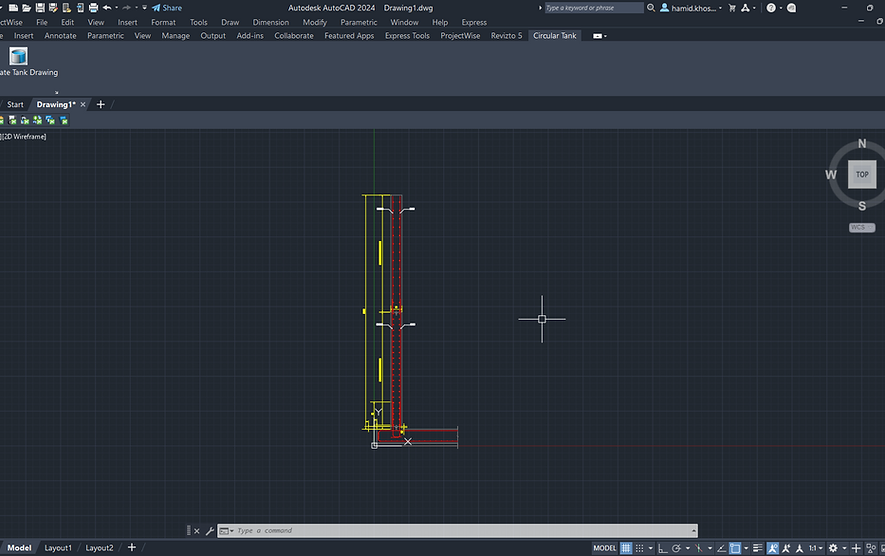
Circular Tank Designer automates the design and detailing of reinforced concrete circular tanks based on the PCA design procedure. The software performs wall thickness estimation, ring force and bending moment analysis, reinforcement design, and presentation of design results. An integrated AutoCAD plug-in automatically generates tank wall sections and reinforcement details from the design results.
Design and Analysis
Circular Tank Designer automates the PCA-based design procedure for reinforced concrete circular tanks. The software performs the following main design and analysis steps:
-
Wall Thickness Estimation
Initial wall thickness is estimated based on ring tension and concrete tensile stress requirements. -
Loading Condition No. 1 – Leakage Test Prior to Backfilling
Ring forces and wall bending moments are calculated for internal liquid pressure before backfilling. -
Loading Condition No. 2 – Empty Tank with Backfill
The software evaluates the effects of external soil pressure and surcharge on the empty tank. -
Loading Condition No. 3 – Full Tank with Soil Resistance Ignored
The full-tank condition is analyzed, including the effects of internal liquid pressure and the structural response of the wall. -
Ring Reinforcement Design
Required horizontal reinforcement is determined from the governing ring-force envelope. -
Vertical Reinforcement Design
Required inside and outside vertical reinforcement is determined from the governing wall bending moments. -
Shear Check
The wall is checked for the governing shear forces. -
Reinforcement Modification
Users can modify bar sizes and spacing at different locations of the wall to develop the final reinforcement layout. -
Design Results and Graphical Presentation
Ring forces, bending moments, reinforcement requirements, and design results are presented in numerical tables and graphical form. -
AutoCAD Drafting
Design results can be saved to a .txt file and imported into the Circular Tank AutoCAD plug-in, which automatically generates tank wall sections and reinforcement details in AutoCAD.
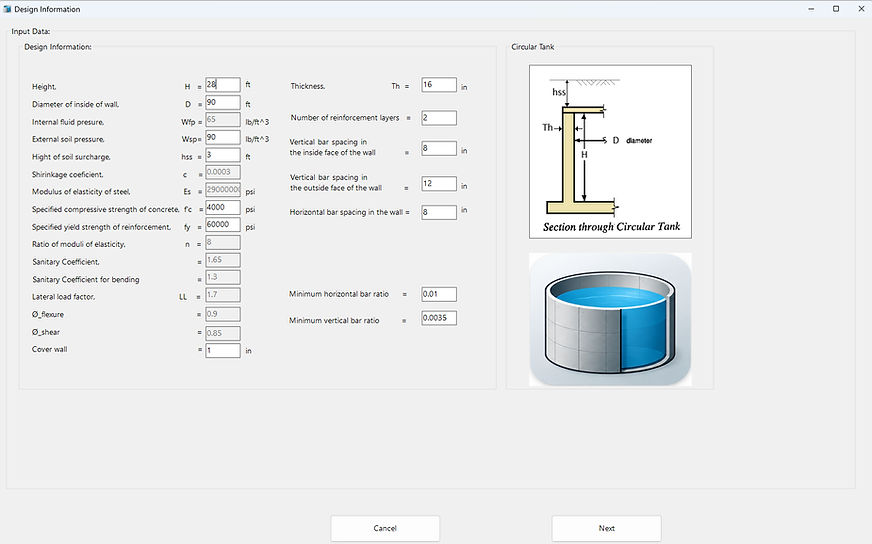
1. Design Information
Define tank geometry, material properties, loading conditions, and initial reinforcement parameters. Built-in input validation helps ensure that valid design data are used for the analysis.
2. Analysis & Design
Circular Tank Designer performs wall thickness estimation, loading-condition analysis, ring-force and bending-moment calculations, reinforcement design, and shear checks.

3. Design Results & Reinforcement
Review numerical and graphical design results and modify reinforcement bar sizes and spacing at different wall locations to develop the final reinforcement layout.

4. AutoCAD Drafting
Save the design results to a .txt file and import them into the Circular Tank AutoCAD plug-in. The plug-in automatically generates tank wall sections and reinforcement details in AutoCAD.